Instructions for Downloading & Installing Presets
- You can download the presets file from the payment confirmation page after you have checked out OR you will receive an email that includes a link to your order to download the presets. You can download the presets two times.
- From your phone click on the download link.
- Go to the files folder on iPhone. The .zip file will be there labeled JANAE ROBERTS PRESETS.ZIP

- Click the .ZIP file to unzip the files into a folder

- Open the folder with the unzipped files

- Select one of the files to open it and click the share button in the bottom left. Scroll to find the Lightroom app and select the app.

- After you choose the app you will get a confirmation. Select "Launch Lightroom Now"

- Lightroom will open the file (it will be the picture shown below).

- Click the menu at top right and select Create Preset

- Name the preset.
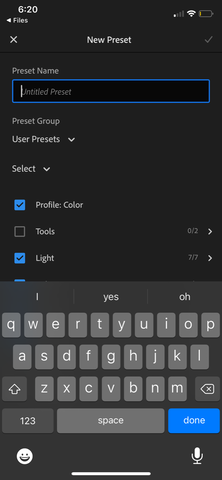
- YOU'RE DONE! Enjoy the presets.